The Simple Website Detail That Makes Your Ketamine Clinic Look More Trustworthy
We see a lot of ketamine clinic websites. And a lot of them look great. You can tell they put thought and effort into them (or hired someone to put the thought and effort in.) But there’s one thing we’ve seen over and over again that really bothers us. Why? Well, this is a stigmatized industry. People are still very wary of ketamine treatments, so putting a trustworthy story out there is vital to making sure your potential patients trust you. So what is it? The simple favicon (the little logo that appears in the tab at the top of the browser when someone is on your site.)
A favicon will not make a weak clinic website credible. But the absence of one can make an otherwise polished clinic look unfinished (or worse, fake.) And in a category built on trust, that small gap is worth closing.
Do you run a ketamine clinic? HealingMaps has launched the first Group Purchasing Organization built for the ketamine industry — and it’s free to join. Members get 40%+ off medical supplies, discounted professional liability and medmal insurance for ketamine practitioners, LegitScript certification at a reduced rate, and HIPAA-compliant credit card processing. There’s zero cost or obligation to become a member.
A favicon is the small icon that appears in a browser tab, a bookmark, a search result, a mobile shortcut or a saved link. It is usually a simplified version of your logo, mark or initials, and most patients could not name it if you asked. Many will never consciously notice it at all.
What they do notice is whether a website feels finished. They register when a clinic looks established, when a tab is easy to recognize, and when a competitor’s site still shows the default WordPress icon, a plain Squarespace box or a blank globe. Those impressions form in seconds, and they are hard to undo.
For ketamine clinics, signals that small still carry real weight.
Why This Small Icon Carries Weight
Ketamine care is a trust sensitive category. Patients often research treatment while they are depressed, anxious, exhausted or skeptical, and they are frequently comparing several clinics in a single sitting. Your website is not just a brochure in that moment. It is part of the clinical trust experience, and every detail either adds to it or quietly chips away at it.
A missing favicon sends a message you never intended. Maybe the site is new. Maybe the brand is unfinished. Maybe no one reviewed the details closely enough to catch it. None of that has to be true, because patients are not grading your internal process. They are reacting to what sits in front of them.
A favicon helps your site look complete, and it makes your clinic easier to find when a patient has five or six treatment pages open at once. When they go back to build a shortlist, the tab with your recognizable mark is the one they return to. That matters more than it sounds.
What a Good Favicon Should Do
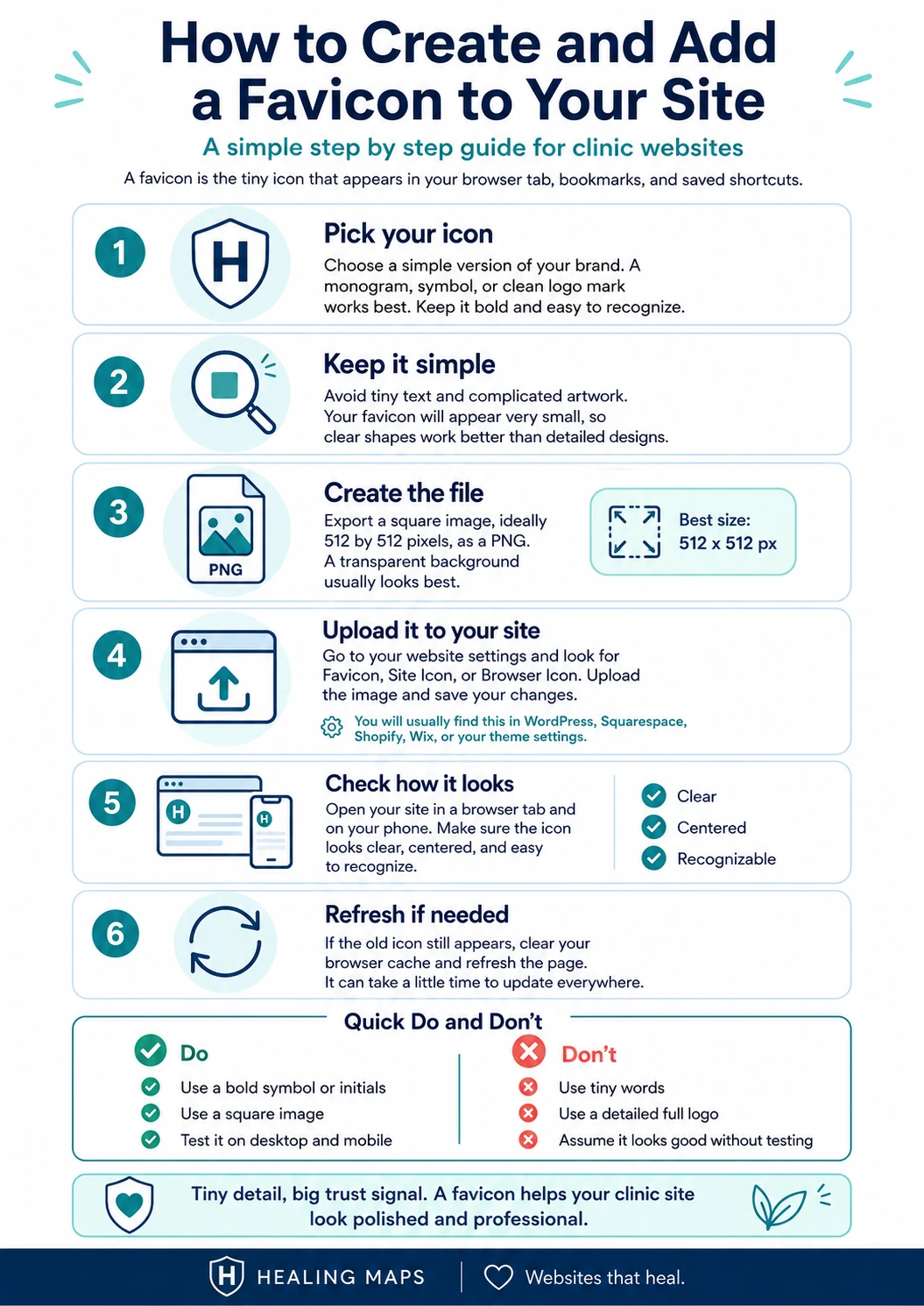
A good favicon is simple enough to read clearly when it is only sixteen pixels wide. This is not the place for your full logo, your complete clinic name or a detailed illustration, because anything intricate turns to mud at that size.
Use a recognizable mark, a set of initials or a clean symbol instead. Avoid thin lines, small words and busy shapes. The goal is not to explain your entire brand in a browser tab. The goal is to make your site instantly identifiable the moment someone glances at it.
If your logo already has a strong standalone icon, use that. If it does not, a simple monogram works well, and two or three legible letters are often all you need.
How to Create and Install One
The whole process takes minutes rather than a redesign, and you do not need a developer to do it.
Start with the artwork. You want a square image, ideally 512 by 512 pixels, saved as a PNG with a transparent or solid background. If you already have a clean logo mark, that file is your starting point. If you do not, a free tool can build one for you. Favicon.io will generate an icon from text, an emoji or an uploaded image in a few clicks. RealFaviconGenerator goes further, previewing how your icon will look across browsers, phones and bookmarks, then packaging every size you need.
Once you have the image, installing it is straightforward. In WordPress, go to Appearance, then Customize, then Site Identity, and upload your file in the Site Icon field. If your theme uses the newer site editor and you do not see the Customize option, you can set the same icon through your theme’s site identity panel or a lightweight plugin. In Squarespace, open the Design panel and look for Browser Icon or Favicon. Wix, Webflow and most other builders keep the setting under general or branding options, usually a quick search for “favicon” away in their help menu.
If an agency or freelancer built your site, this is a two minute request. Send them your square logo file and ask them to set it as the site icon or favicon. Anyone who works in web design will know exactly what you mean.
Before you call it done, test it. Open your site on a desktop browser and on your phone, then save it to your home screen. A favicon that looks crisp in a design file can vanish or blur in real conditions, and the only way to know is to look.
One note on search results. Your icon will appear in the browser tab immediately, but Google can take several days to show it beside your listing, because it waits to recrawl your site first. Google also prefers a square icon sized in multiples of forty eight pixels. So if your favicon does not show up in search right away, nothing is broken. It simply has not been picked up yet.
The Quick Clinic Website Check
You can audit this in under a minute. Open your clinic website and look at the browser tab. Do you see your brand, or a generic default icon? Then search your clinic name on Google and check whether your icon appears next to the result. Finally, save the site to your phone home screen and see what shows up there.
If the answer is blank, blurry or generic, you have found an easy thing to fix.
None of this is the most important thing on your website. Your clinical information, safety language, pricing, provider credentials and conversion path all matter more, and they should. But professionalism is cumulative, and trust is built from the sum of small, consistent signals. In a field where patients are actively looking for reasons to believe in you, a favicon is one of the simplest to get right.
While you are reviewing those trust signals, it is worth confirming that your HealingMaps listing is as complete and current as your website. For many patients it is the first place they meet your clinic, and the same principle applies there. Small details add up.